🎯 Learning Objectives
- Use Researcher to build a citation-backed marketing plan
- Use Analyst to identify customer segments and model financials
- Understand when to reach for each agent
📋 Demo Setup
Download the Researcher and Analyst Demo - Content Pack for all required files.
💡 TIP: Create a demo SharePoint site to host the files, or reference them locally with /.
To access the agents:
- Open the Copilot app at m365.cloud.microsoft.
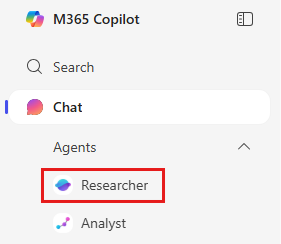
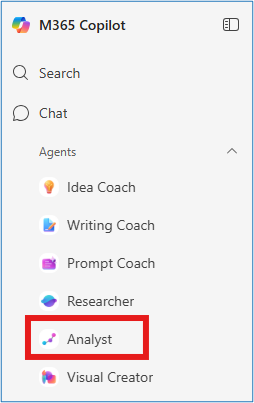
- Use the left navigation to select Researcher or Analyst.
📝 Note: Point Researcher and Analyst at internal files (SharePoint/OneDrive) for grounded insights.
Part 1: Researcher — Build a Marketing Plan
💡 Why This Matters: Researcher acts like a senior consultant — blending internal files, competitor intelligence, and web sources into structured deliverables with citations.
⚠️ IMPORTANT: Run this prompt at the start of training (slide 5) — Researcher needs a few minutes to complete it.
- Open Researcher from the left navigation of the Copilot app.
- Enter the prompt below.
Create a marketing plan for our newest SprintCycle EV charger launch. Emphasize its AI-powered adaptive charging, modular design, and biometric access control. Make sure to include recommendations on the right digital channels and content strategy. Include insights from competitors and our past GTM campaigns.
- Attach reference files using /:
- /SprintCycle Charger Product Launch.docx
- (Optional) /Contoso - PedalPerks GTM Plan.docx
- Click Submit and watch Researcher work.
Researcher will combine internal and web sources, structure a marketing plan with channel recommendations, and cite its sources so you can validate.
📝 Note: Researcher shows its chain of thought and can call other agents when needed.
✅ Self-Check: Part 1
Part 2: Analyst — Segment Customers & Model Financials
💡 Why This Matters: Analyst behaves like a data scientist on your team — performing advanced analysis and Python execution, with visualizations to back its recommendations.
- Open Analyst from the left navigation.
- Enter the prompt below.
Find the right customer segment and demographic to sell our new EV charger, include a graph to show how this will maximize our market opportunity.
- Attach BoulderEV ebike Internal Market Forecast.xlsx using +.

- Click Submit.
Additional Analyst scenarios
Each follows the same pattern: prompt → attach file → submit → review.
Financial Projection
Build a 5-year financial projection from this data along with a graph to view revenue growth over time.
File: BoulderEV ebike Internal Market Forecast.xlsx
Sales Performance
Analyze sales volume across locations to identify our highest and lowest performing stores, along with a visualization of the best-selling products.
File: BoulderEV ebike Internal Market Forecast.xlsx
Campaign Performance
Analyze and visualize how the marketing campaign performed across each target segment and help me decide where to re-target our next campaign.
File: BoulderEV ebike Internal Market Forecast.xlsx
✅ Self-Check: Part 2
🔑 Key Takeaways
🧠
Researcher = Strategy
Citation-backed deliverables in minutes.
🧮
Analyst = Data Science
Advanced analysis without needing to code.
🔗
Better Together
Pair them for the full strategy-to-execution flow.
⏱️
Weeks → Minutes
Shorten the path from question to insight.